AI will do T.H.A.T.
AI-powered building design · A$299 per month

Design optimal residential developments in minutes, not weeks.

Draw or import a site, set your planning controls, and AI generates options for apartment buildings, townhouse rows, duplexes or house-and-land lots, with floor plans, parking, costs and profit, each checked against your controls. Then export to Excel, CAD and BIM.

No install·A$299/month, cancel any time·Works offline once installed·XLSX, DXF and IFC

Already have an account? Sign in →

The designer showing a generated scheme of three apartment blocks: the typical floor plan colour-coded by unit type, a selected apartment's room schedule, and live figures for units, floor area and parking
How it works

Three steps from a lot to a feasibility.

1

Input

Search the address to pull in surrounding buildings, roads, trees and terrain from open data. Draw the boundary, pick it from the map or import a DXF survey. Set setbacks, height, FSR, unit mix and parking rates, or describe the project in plain English and let AI fill them in.

2

AI generation

The generator tests hundreds of orientations, depths and typologies inside your buildable envelope, keeps the required separation, sets storeys under your caps, plans every floor and basement, and ranks the options for yield, amenity or profit. Usually in under three seconds.

3

Output

Compare the options, refine the one you like by hand, and read the unit program, areas, compliance, costs and return as you go. Export the result as an Excel report, CAD drawings or an IFC model for Revit, ArchiCAD and other BIM tools.

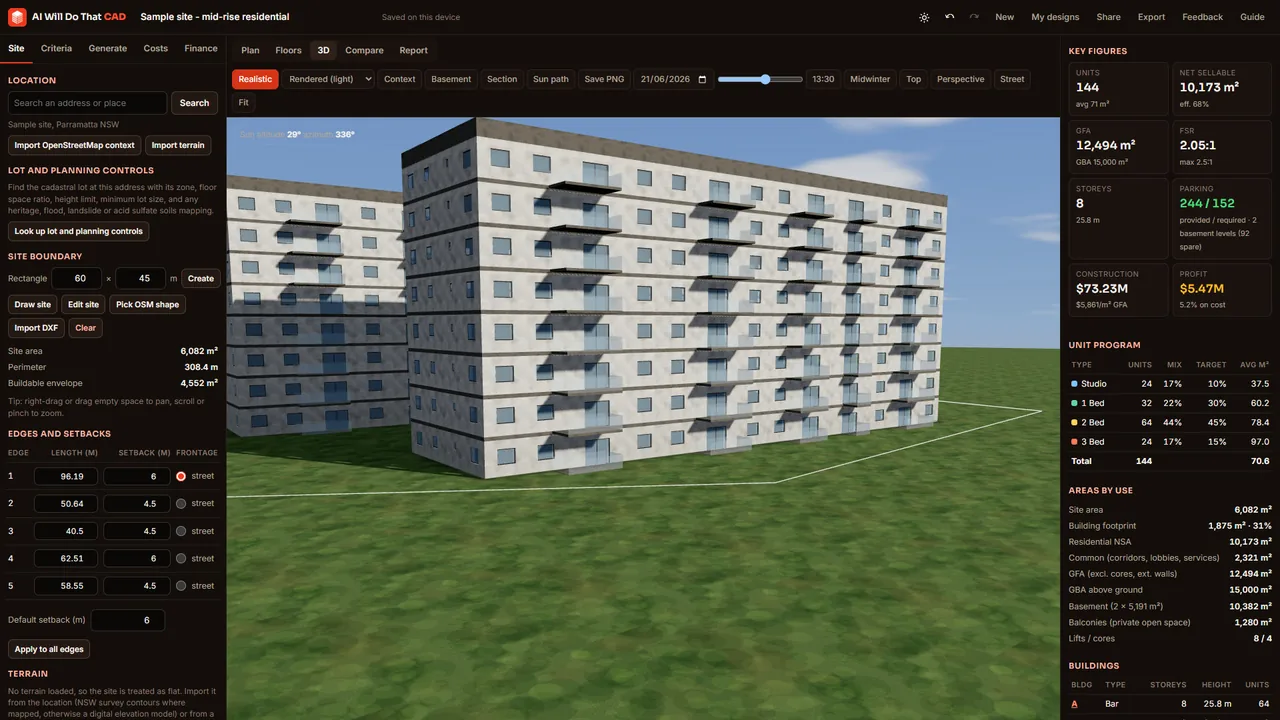
Realistic 3D render of the sample three-building apartment scheme under a clear sky, with light rendered facades, recessed glazing, glass balustrades and midwinter noon shadows on the grass
See it before you draw it

Massing, floors and basements in 3D, with real sun.

Orbit the scheme, colour it by building, height, unit type or midwinter sun hours, and slide the sun through any day of the year. Shadows are calculated for your exact location. Switch to the realistic render for a presentation view with sky, materials, glazing and soft shadows.

  • Realistic render: rendered or brick facades, recessed windows, glass balustrades, roofs, grass, roads and trees, saved as a high-resolution PNG
  • Midwinter solar access for every apartment
  • Surrounding buildings and trees from OpenStreetMap
  • Terrain from a digital elevation model, editable with a brush
  • Basement levels, ramp and parking bays below ground
Everything in one place

The full feasibility workflow, in the browser.

Site to spreadsheet without switching tools.

Site, zoning and overlays

Draw or edit the boundary, or find the lot from a NSW address with its zone, FSR, height, minimum lot size and any heritage, flood, landslide or acid sulfate soils mapping. Zone rules say what you can build. Import context from OpenStreetMap or a DXF survey.

Topography and services

Surveyed 2 m contours and spot heights for NSW sites (a digital elevation model elsewhere, or DXF levels), labelled on the plan and shown as a 3D surface. Record the water, sewer, stormwater and electricity at the frontage and get the demand, substation, meter and detention sizing with the connection costs.

Generative massing

Linear bars, L, U, courtyard, H-blocks and point towers. Choose which typologies to try and what to optimise: yield, amenity, sun or profit.

Townhouses, duplexes, houses and granny flats

Houses mode lays out townhouse rows with shared driveways, duplex lots and house-and-land subdivisions with a new road, or a single house on one lot with or without a granny flat. Every lot gets its area, frontage, coverage, garden and garage checked, with pitched roofs in 3D; granny flats are checked against the NSW complying-development limits (lot size and width, 60 m² floor area, height, setbacks) and shown with their cost, added value and rent.

Floor planner

Every floor laid out with lift and stair cores, corridors and apartments, drawn with their rooms, furniture, windows and doors. Drag party walls to resize units, change a unit's use to common area or open space, and overlay another level for reference.

Dwelling planner

Click any dwelling for its room schedule and a detailed plan: bedrooms, living, kitchen, bathrooms, laundry and hall with doors and sized windows. Drag partitions, slide or resize windows and doors, add openings, and check minimum dimensions and target areas with colour overlays.

Basement parking

Ramp at the frontage, aisles and perpendicular bays, accessible bays near the cores and storage cages. Levels are added until demand is met.

Live unit program

Units by type against your target mix, average sizes, GFA, GBA, net sellable area, efficiency, coverage and FSR, all updating as you change anything.

Compliance checks

Zone permissibility, height, storeys, FSR, coverage, setbacks, separation, depth, unit sizes, rooms, sun, cross-ventilation, parking, deep soil, landscaping and flood floor levels, with heritage, bushfire and soil constraints flagged, each shown as pass, warning or fail.

Quantities and costs

An automatic bill of quantities measured from the design (excavation, retention, frame, facade, glazing, lifts, fit-out, services) with unit rates you can edit.

Feasibility

Revenue by typology, GST, selling costs, land, duty, fees, contributions and finance, giving profit, margin on cost, residual land value and a price/cost sensitivity grid.

Presets, compare and share

Save settings as presets and add your own typologies, rules and KPI formulas such as cost / nsa. Compare options side by side, and share a view-only or copyable link.

Exports

Take the result into the tools you already use.

XLSXSummary with site and floor plan images, unit program, areas by floor, a schedule of every unit, budget, feasibility, compliance and parking.
DXFSite plan, ground and typical floor plans with unit and room outlines, the basement layout and four elevations, on named layers.
IFC4Buildings, storeys, slabs, external, corridor and party walls, apartments and cores as spaces with areas and properties, plus basement levels.
OBJ · PNG · PDF3D massing for visualisation, high-resolution plan images, and a printable report with drawings, figures and compliance.
Who it is for

Built for the first, fastest question: what fits?

Architects

Test massing options before the first sketch and bring numbers to the client meeting.

Developers

Screen sites in minutes: yield, parking, cost, profit and the residual land value you can afford to pay.

Planners and valuers

See what a set of controls actually produces on a real lot, and compare scenarios side by side.

Builders

Early quantities and a budget from the design itself, ready to refine with your own rates.

Australian defaults, global rules

Starts with sensible local settings. Every one is yours to change.

Defaults follow the NSW Apartment Design Guide (minimum apartment sizes, 12/18/24 m separation, 2.7 m ceilings, eight units per core, 2 hours of midwinter sun for 70% of units) and AS/NZS 2890.1 car-park geometry, with indicative 2026 Sydney construction rates in AUD.

Working somewhere else? Change the controls, rates and prices, then save them as a preset.

Generated options gallery beside the compliance checklist and feasibility figures
Pricing and access

A$299 per month. Cancel any time.

One plan with everything in it. Create your account, sign in with the link we email you (no password), and subscribe inside the designer with a card. Beta testers and partners with an access code use the designer free: enter the code when you sign up.

A$299per month
cancel any time
  • Unlimited designs, generated options, exports (XLSX, DXF, IFC, OBJ, PDF) and AI briefs
  • Apartments, townhouses, duplexes, house lots, single houses and granny flats
  • NSW lot and planning lookup, contours, services and the realistic 3D render
  • Works offline once installed; your designs stay on your device
  • New features as they land, and a direct line to the team

Secure card payment by Stripe, prices in Australian dollars, receipts by email. Subscriptions renew monthly until you cancel on your plan page.

Already have an account? Sign in on this device.

Create your account

Beta testers: your code gives free access.
✓ Account created. Check your email for your sign-in link (and your spam folder).

A$299 per month after you sign in, cancel any time; free with a valid access code. We only use your details to run your account and reply to you. See our privacy policy and terms.

Custom and enterprise

Your typologies. Your cost database. Your feasibility model.

AI Will Do That builds custom versions of the designer for developers and practices: your apartment plans and standards digitised as typologies, your design rules, your QS rates and bill-of-quantities lines, your feasibility model wired in, and BIM output to your template.

  • Typology libraries from your existing projects
  • Rules and ratios that match your design standards
  • Connection to your feasibility spreadsheet or system
  • Team accounts and private hosting on request

Talk to us about a custom build

✓ Sent - thanks. A human will reply within one business day.

We only use your details to reply. See our privacy policy.

FAQ

Questions people ask first.

What is AI Will Do That CAD?
A browser-based generative design tool for residential developments. You give it a site and design criteria; it generates optimised building options with floor plans, basement parking, areas, compliance checks, costs and feasibility, and exports them to Excel, CAD (DXF) and BIM (IFC).
How much does it cost?
A$299 per month, cancel any time, for everything in the designer. Beta testers and partners with an access code use it free. There is no password: you sign in with a link we email you. Custom versions with your own typologies, cost database or feasibility model are built by AI Will Do That as a paid project: ask us.
Where is my design stored?
In your browser on your device (IndexedDB). Nothing leaves your device unless you search a location, import OpenStreetMap or terrain data, use the AI assistant, or create a share link. The only cookie the designer sets is your beta sign-in. See the data and disclaimer page.
How does the AI generate designs?
A generative engine tests hundreds of combinations of orientation, wing depth and building typology inside your buildable envelope, packs buildings with the required separation, sets storeys under the height and FSR limits, plans every floor and basement, and ranks the options against your objective. A Claude-powered assistant can also turn a written brief into design criteria and review an option.
Can it design townhouses, duplexes or house-and-land lots?
Yes. Switch the project type to Houses (Criteria tab) and the generator lays out townhouse rows with shared driveways, duplex lots, or detached house lots along the street or a new road. Each dwelling gets a garage and rooms over one or two storeys, each lot is checked for size, frontage, coverage, landscaping and private open space, and the feasibility prices every dwelling, or sells the lots as vacant land. Open the houses sample.
Which file formats can I export?
XLSX (summary, unit program, areas, unit and room schedules, budget, feasibility, compliance, parking and lots, with plan images), DXF (site plan, ground and typical floor plans with rooms, windows and doors on their own layers, basement and four elevations), IFC4 (storeys, slabs, walls with window and door openings, spaces with quantities), OBJ, PNG plans and 3D views, a project JSON file and a printable PDF report.
Does it check planning compliance?
It checks each option against the controls you enter: height, storeys, FSR, coverage, setbacks, building separation, depth, unit sizes, room dimensions, midwinter sun, cross-ventilation, parking, deep soil, open space and landscaped area, plus whether the project type is permitted in the zone and any heritage, flood, bushfire, landslide or acid sulfate soils constraints on the site. Defaults follow the NSW Apartment Design Guide, but every value is editable. The results are indicative, not a planning assessment.
Can I use my own site survey?
Yes. Import an ASCII DXF and the largest closed polyline (or one on a SITE or BOUNDARY layer) becomes the site boundary. Spot heights and contour elevations in the file become the terrain.
How do I get access?
Use the Create your account form on this page, open the sign-in link we email you, then subscribe on your plan page with a card (A$299 per month, cancel any time) or enter your access code. Your browser stays signed in for about six months; ask for a new link on any other device.
Does it work offline?
Yes. Install it as an app from your browser and the designer, generator, 3D view and exports all work offline. Location search, OpenStreetMap and terrain import, the AI assistant and share links need a connection.

See what fits on your site.

Open the designer, load the sample, and have ranked options with floor plans and a feasibility before your coffee cools.